
March 9, 2026
6 min Read
Introduction
A question came up recently in a Reddit thread:
We have six operating companies in NetSuite OneWorld. Five will be merged into one surviving entity. What should we do with open AR/AP and the other balances?
This situation is more common than most finance teams expect. In fact, NetSuite-to-NetSuite migrations are the 3rd most common migration I work with (after QuickBooks Online and QuickBooks Desktop migrations).
It usually comes up during:
- Corporate acquisitions and reorganizations
- Private equity ownership changes
- Post-acquisition simplification
And while NetSuite makes it easy to create subsidiaries, it does not provide a simple “merge subsidiary” button.
So finance teams are left asking:
- What happens to open AR and AP?
- Should we journal balances between subsidiaries?
- How do we cleanly close the old entities?
Over the years, I've helped several clients handle this exact scenario, including acquisitions and mergers where one subsidiary is absorbed into another.
The goal is always the same:
Leave the old subsidiary with a zero trial balance and cleanly transfer the financial position to the new entity.
Below is the process I typically recommend.
Step 1: Move the Balance Sheet to the New Subsidiary
Start by generating a detailed trial balance (link to instructions) for the subsidiary to be closed.
Run the report as of the cutover date.
This becomes the source file for the migration.
Using that report, create a journal entry in the new subsidiary to recreate the balance sheet.
Key considerations:
- Bank and credit card accounts must be recreated with the subsidiary assigned. This is because these account types can only be assigned to a single subsidiary.
- Intercompany accounts should be evaluated carefully.
- Segment mappings (department, class, location) should match the new reporting structure. Be sure to update these records so they are available for the new subsidiary.
Once the entry is uploaded, run a trial balance tie-out between the source and destination subsidiaries.
At this point, the new subsidiary should have a fully reconstructed balance sheet.
Step 2: Reverse the Balances in the Old Subsidiary
Next, reverse the same balances in the subsidiary that is being closed.
This is simply the mirror image of Step 1.
Using the same trial balance file:
- Flip debits and credits
- Import the reversing journal entry
- Post it in the closing subsidiary
After posting, rerun the trial balance.
The expectation is that every account balance should now be zero.
Occasionally, you will see small residual balances due to department or class segmentation, but the net subsidiary balance should be zero.
Step 3: Recreate Open AR and AP in the New Subsidiary
Balance sheet transfers move the AR and AP totals, but they do not recreate the transaction-level records.
If the business wants to continue managing collections and vendor payments in the new entity, the open transactions must be recreated. This mirrors the process during a net-new NetSuite implementation. See my guides on loading open AR and open AP transactions.
In many implementations, customers and vendors already exist as multi-subsidiary records, which simplifies this step. You’ll need to run an update to include the new subsidiary on these records for the imports to be successful. This can be completed with a CSV import.
If you do not have the multi-subsidiary settings turned on, the entities will need to be recreated and assigned to the new subsidiary.
Step 4: Clear AR and AP in the Old Subsidiary
Once the open transactions have been recreated in the new subsidiary, the balances must be cleared in the old one.
This step is often misunderstood. The journal entry from step 2 did create a zero-dollar AR and AP balance. But when you run the aging report, the offset isn’t allocated to the individual entity records. This step allocates that balance to the individual entities with a zero-dollar AR/AP entry.
Instead, the journal entry must balance by customer or vendor.
The process usually looks like this:
- Run the AR or AP aging detail report
- Calculate the balance by customer or vendor
- Create a journal entry that offsets each entity's balance
- Import the journal entry
- Apply the journal to open invoices or bills
For AR, this means creating zero-dollar customer payments to apply the journal entries to the invoices.
For AP, the same process occurs through the Pay Bills page.
After application, the aging report should show:
- Every customer/vendor balance = zero
- Total subsidiary AR/AP balance = zero
Step 5: Handle Operational Records
Operational transactions require a separate decision.
These include:
- Open bank reconciliations (guide)
- Open inventory balances (guide)
- Sales orders (guide)
- Purchase orders (guide)
- Work orders
- Projects
- Fixed asset records
With these records, you must recreate them in the new subsidiary. The decision should consider:
- In-flight transaction status
- Revenue recognition implications
- Contract structure
There is rarely a perfect automated solution here. I’d recommend engaging a strong NetSuite partner to understand the full implications of this type of transaction, especially when item records are involved.
Final Goal: A Clean Cutover
When the process is complete:
The old subsidiary should show:
- Zero trial balance
- Zero AR aging
- Zero AP aging
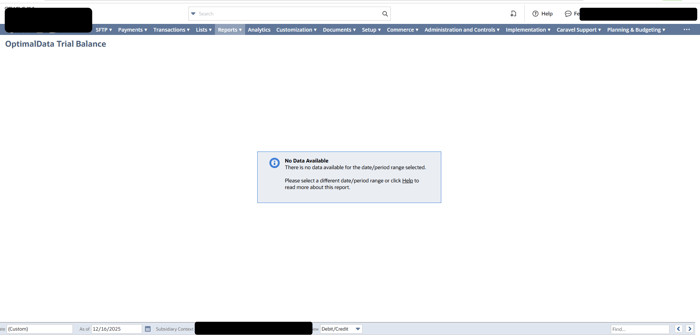
The new subsidiary should contain:
- Recreated balance sheet
- Recreated open receivables and payables
- Ongoing operational activity
From an accounting standpoint, the transition is clean and auditable.
Common Pitfalls
A few issues I've seen in these projects:
Item records
If you are using serialized, matrix, or assembly items, you should exercise significant care when updating the item records. This can cause significant challenges when migrating inventory balances between subsidiaries.
Forgetting entity-level AR/AP clearing
You must offset balances by customer or vendor, not just the control account.
Multiple AR/AP accounts
Some companies use multiple control accounts across departments or subsidiaries.
Your reports must include the account's internal ID to ensure that your offset journal hits the correct AP/AR account.
Residual unapplied payments
If payments or credits remain unapplied before the migration, they create cleanup issues later.
Final Thoughts
NetSuite makes it easy to manage multiple subsidiaries, but restructuring them requires careful accounting work.
The key principle is simple:
Move the balances forward, then zero out the old entity cleanly.
If done correctly, the result is a clean audit trail and a smooth operational transition.
If you're planning a subsidiary merge or post-acquisition consolidation inside NetSuite, feel free to reach out.
I've helped many teams migrate and reconcile financial history during these transitions, and the biggest wins usually come from getting the data structure right before the cutover.

.png?width=352&name=NetSuite%20CSV%20Import%20Tool%20(1).png)