NetSuite, Implementation, Segments

Segment Structure Basics in NetSuite

NetSuite has five standard segments: GL accounts, departments, classes, locations, and subsidiaries. Together, they're how the system classifies every financial transaction and how your reporting is built. Setting up this structure is one of the first tasks in any NetSuite implementation.

Key takeaways:

  • NetSuite's five standard segments are GL accounts, departments, classes, locations, and subsidiaries.
  • You can rename any segment except GL accounts, and add custom segments if you need more.
  • Keep the structure simple when implementing NetSuite: it's easier to add complexity later than to unwind it.

NetSuite's segment structure is more robust than QuickBooks and flexible enough to handle most reporting needs. Below, I cover what segments are, walk through each standard segment, touch on adding custom segments, share some general setup guidance, and point you to the next step in the data migration process.

What is a NetSuite segment structure?

The segment structure is the backbone of an organization's financial reporting. Segments are how accounting systems classify financial transactions, and NetSuite's standard segments include GL accounts, departments, classes, locations, and subsidiaries.

The segment structure determines how your reporting looks inside NetSuite. Setting one up is more art than science, since every company has different reporting requirements. Understanding those requirements should drive how you configure segments. Different stakeholders will have different opinions about what they need to see. Some parties worth looping in:

  • Management reporting
  • Board of directors
  • Investors
  • Private equity backers
  • Regulators
  • Auditors

What are segments, and why do they matter?

Segments matter because they determine how your reporting looks in NetSuite for years to come, which is exactly why the structure is worth getting right before your kickoff call, not after. There's no one right way to set a segment structure, though there are wrong ways to do it. Keep it simple, especially in a growing organization, for a few reasons:

  • You can change segments later. Investing time to get this precisely right at implementation isn't as important as making the structure scalable. If you rename a segment value later, NetSuite retroactively applies the change to every past transaction.
  • More segments mean less consistent coding. Accounting teams often require end-users to code transactions themselves. A best practice is to write a simple, one-sentence definition for each segment to keep coding consistent.
  • Segments become meaningless if not maintained.

I had a client, a Boston-based financial services firm, that had multiple segments in their legacy system. Rather than rethinking the structure during their NetSuite implementation, they preserved all of them and added even more on top. Every transaction required a user to make just as many coding decisions. That structure created a poor user experience and left the team with more data than they could actually assess. Years after their go-live, I spoke with the company's new controller, who was seriously considering revamping the entire structure because the team still hadn't grown into it.

The flip side is just as bad. I talked to a prospect running a clinical research organization who had no segments at all, just a GL account list with more than 30,000 values. His account strings encoded vendors, employees, departments, and studies all inside the GL account itself. That structure was actually worse: he was running into real performance issues with a chart of accounts that size.

How long does it take to build a segment structure?

Your future-state chart of accounts is one of the first things your implementation partner will need to set up your NetSuite instance. That makes it worth starting early, well before your kickoff call, since it's easy to underestimate how long it takes to get right.

I worked with a non-profit client consolidating 16 separate QuickBooks Desktop files into a single NetSuite instance. Building the future-state chart of accounts took the controller almost nine months. That delay pushed back the go-live date and stalled momentum on the entire project.

What are NetSuite's standard segments?

A few things to understand about the standard segments before we go through each one:

  • Navigate to them at Setup → Company → Classification. GL accounts live under List → Accounting → Accounts or Setup → Accounting → Chart of Accounts.
  • You can rename every segment except GL accounts to fit your business. For example, biotech companies commonly rename classes to programs. Rename segments at Setup → Company → Rename records/transactions.
  • You can add custom segments if you need more than the standard five.
  • Segments can be configured to have a parent record to form a hierarchy.

General Ledger (GL) Accounts

GL accounts categorize financial transactions by functional activity. Setting up the GL accounts, or chart of accounts (COA), is one of the first steps in any implementation. Each GL account must be assigned an account type, which determines where NetSuite places it on the financial statements.

I have two related articles that go deeper on GL accounts:

I'd also recommend reviewing NetSuite's help article on Chart of Accounts Management for additional guidance.

Departments

Departments represent the organization's cost centers. I recommend your department structure mirror your budget owners. If there's no budget owner for a department, you likely don't need to create it.

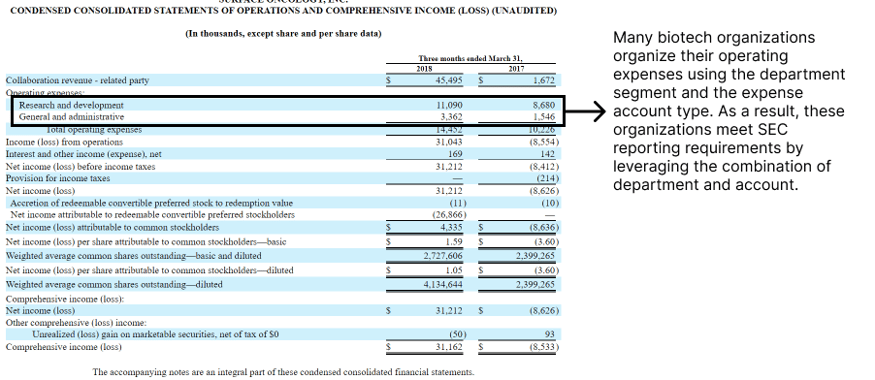
Many biotech clients use their department structure to track GAAP expense classifications for SEC reporting. In the example below, the total R&D expense line is the sum of the R&D department's expenses for the period.
A common pattern I see in QuickBooks Online is clients tracking departments by creating a separate GL account for each, rather than using a dedicated segment. Best practice is to split that out during migration: fold the department details into NetSuite's department (or class) field and let the GL account return to representing the type of transaction. Your segment map file is the right place to document that split so nothing gets lost in translation. See my article on creating a segment map file for details.


NetSuite department P&L report showing R&D expenses summed by department

Classes

Classes are another standard segment for tracking business-relevant data. I've seen this used to track revenue streams for a SaaS business, research program spending in a biotech business, or protocol spending at a clinical research organization (CRO).

A common best practice I see in the biotech industry is renaming the class segment to "program" or "project" to track spending by research program, which supports S-1 reporting requirements.

Another example: a medical products manufacturer used a prefix at the beginning of each item record to track revenue, COGS, and inventory movement by product line. Working with their implementation partner, they replaced that naming convention with a list of eight to ten class values, one per product line. That change let them track revenue by product line directly through the class segment and reduced the number of item SKUs they needed to maintain in NetSuite.

Locations

Locations let you track transactions and employee information across multiple offices or warehouses — for example, a corporate office, sales offices, and warehouses.

By default, each location is assigned to a single subsidiary, though NetSuite has settings that allow a location to be shared across subsidiaries. In my opinion, locations are one of the standard segments I wouldn't recommend repurposing, given the implications for how items are tracked and used in the system. Consult your implementation partner on best practices for locations before deviating from the standard use.

Subsidiaries

Subsidiaries represent the legal entities within your organization and are the segment NetSuite uses to enforce entity-level controls. Every transaction rolls up to a subsidiary, and NetSuite's OneWorld edition uses this segment to keep each entity's books, currencies, and intercompany activity properly separated.

A few things that make subsidiaries different from the other standard segments:

  • Bank and credit card accounts must belong to a single subsidiary.
  • One subsidiary can't pay another subsidiary's vendor bills directly — intercompany activity requires proper due-to/due-from postings.
  • Subsidiary structure is much harder to change after go-live than departments, classes, or locations, so it's worth getting right during implementation rather than after.

A recent example: a company migrating from Sage 300 had a complex, multi-entity structure, but its legacy system lacked anything like NetSuite's subsidiary controls. They were storing subsidiary data in a field never designed to control legal entities. That approach can work fine in a system that doesn't enforce entity-level rules, but it creates real problems moving into NetSuite, where those rules are strict. Before the deal even closed, we reviewed a full month of their detailed transactions to confirm a transaction-level migration would actually function within NetSuite's subsidiary framework. That validation step is what catches subsidiary problems before they become go-live problems.

When do you need a custom segment in NetSuite?

The five standard segments cover most reporting needs, but not all. If your organization needs to report on something the standard segments can't capture, NetSuite lets you add custom segments.

A good example: a medical products manufacturer mentioned above had several trade show lines running through their chart of accounts. Their CFO wanted to track revenue and expenses by trade show to justify year-over-year attendance decisions. Their implementation partner and I debated the best way to handle this. The first idea was to use NetSuite's native project functionality, but that didn't work: projects tie to a single customer, and trade show revenue needed to be attributed across multiple customers. A custom segment was the right approach instead, since it let the client tag revenue and expenses by tradeshow regardless of which customer the transaction belonged to.

Custom segments are also common in specific industries. Non-profits, for example, have access to a NetSuite bundle with industry-specific segments, including functional expense and household tracking. If you're implementing NetSuite in a specialized industry, ask your implementation partner whether an industry-specific bundle like this is available and whether it's worth working with a vertical-specific implementation partner who already knows the functionality available for your industry.

Should I change my segment structure?

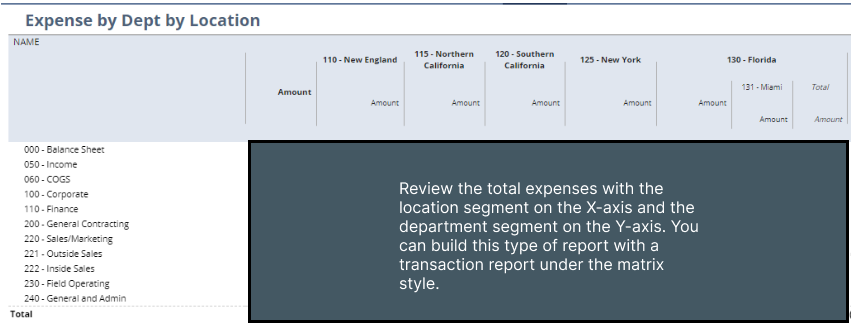
A NetSuite implementation is an excellent opportunity to revisit your segment structure. I'd recommend taking the time to work with your key stakeholders to improve how your organization reports data. One of NetSuite's key advantages over QuickBooks is the ability to report across multiple segments — but you can only take advantage of that if you have a well-thought-out structure.

NetSuite matrix-style report showing revenue broken out across multiple segments

When making these updates, I'd recommend tracking how your legacy segment values will map to the new NetSuite segment values. This makes it much easier to build your segment map file. See this article on setting up a segment map file.

I also always add a custom field on each segment record to store the legacy value it maps from. It's saved me more times than I can count: whether the client needs to reference the old value later, or we discover a mistake in the map file and need to remap a value, having that legacy reference sitting right on the record makes it a quick fix instead of a re-investigation.

Should I create segment values manually or load them from a CSV file?

If you have more than five values in a segment list, I'd recommend loading them into NetSuite via CSV import. Navigate to the CSV import page at Setup → Import/Export → Import CSV Records. GL accounts are the default record type to import; class, department, and location records are under the Classification import type.

You'll need to create any parent records before their children. For example, to make "Biology" a child of the "R&D" department, you'll need to create the "R&D" department first.

Should I include a number in my segment names?

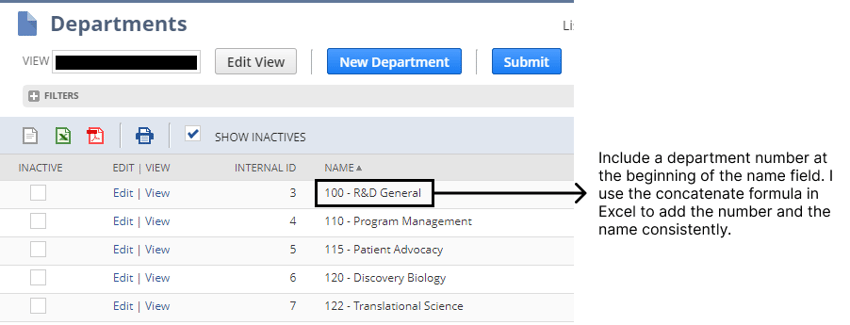
Yes. I recommend including a number in department, class, and location names, even though only GL accounts have a dedicated account-number field. NetSuite doesn't split the name and number for other segments the way it does for GL accounts, but that doesn't mean you should skip a number. Use a concatenate formula to put the number at the beginning of the name. See the screenshot below.

Example of a NetSuite department name with a leading number, e.g. "010 - Sales"

Closing

Building a logical segment structure for your business requires experience and an understanding of your organization to ensure success with NetSuite's reporting capabilities. Contact us if you and your team need help planning and loading your segment structure, or check out our implementation resource page for more tips related to your NetSuite implementation. We're ready to help.

OptimalData contact us CTA


Subscribe for updates!