Data Migration, QuickBooks, Case Studies
6 min Read
QuickBooks Desktop to NetSuite: A Project Cost Migration Case Study
A renewable energy company operated multiple legal entities, but QuickBooks Desktop provided only limited project reporting. That combination left leadership without a reliable, consolidated view of project costs, which drove their migration from QuickBooks Desktop to NetSuite. OptimalData migrated more than 22,000 detailed transactions across two years plus earlier summary balances, mapped the full set of customers, vendors, and GL accounts, and later moved history to a cleaner project structure after go-live without reloading a single transaction. This case study walks through how the migration was scoped, the one structural decision that made the post-go-live cleanup possible, and how the relationship continues today.
TL;DR
- Project cost tracking across multiple legal entities was the driver. QuickBooks Desktop offered only limited project reporting and no native multi-entity consolidation, so the finance team moved to NetSuite.
- OptimalData migrated more than 22,000 detailed transactions across two years, plus prior-period summary balances, and mapped the full customer, vendor, and GL account set.
- The client signed in mid-March and went live on NetSuite in July, with data migration never on the critical path.
- Line-level segments gave the team job-level cost and revenue reporting, and enough flexibility to move history from sub-customers to native project records after go-live with no reload.
- QuickBooks Desktop offered no direct system access, so OptimalData built the source reports directly with the client and ran extractions manually.
- The engagement continued after go-live: a recurring process loads payroll, expense, and credit card activity by project, keeping the monthly close on track while the integration is finalized.
Why a renewable energy company moved off QuickBooks Desktop
The client is a renewable energy company in which project cost data is central to the business. Two constraints pushed them off QuickBooks Desktop. First, they ran multiple legal entities, which QuickBooks Desktop handles as separate company files with no native consolidation. Second, its project reporting was limited, so leadership could not track project costs with the confidence the business required. NetSuite solved both multi-subsidiary consolidation and project-level accounting in a single system.
The client ran a lean internal team. Managing a full historical migration in-house, on top of day-to-day operations, was not realistic. That is where OptimalData stepped in, handling the data work so the team could stay focused on the close and the go-live.
What we migrated
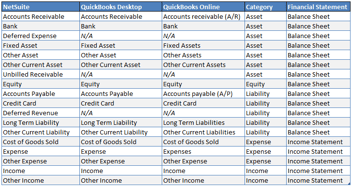
OptimalData owned the data migration end-to-end, starting with a full mapping exercise for customers, vendors, and GL accounts.
The historical financials were layered by how much detail each period actually needed:
- An opening balance sheet as of December 31, 2021
- Net change entries (period-level summary journals) for 2022 and 2023
- Full detailed transactions for 2024 and 2025
That last layer, the two years of transaction-level detail, came to 22,463 records:
- 13,064 journal entries
- 3,484 vendor bills
- 3,474 bill payments
- 1,453 checks
- 595 invoices
- 347 customer payments
- 46 credit memos and bill credits
Bringing two full years of detail into NetSuite, rather than opening balances alone, gave the team the project cost history they needed to run reporting from day one. The lighter treatment of the earlier years kept the load efficient without losing the ability to reconcile back to the legacy books.
Why line-level segments matter for job-level cost and revenue
For a project-based business like this one, the reason to move to NetSuite is job-level visibility into costs and revenue by project. That only works when segment values are applied at the line level of every transaction, not just on the header or the customer record. Line-level detail is what lets the team see the true project cost and margin, tie the dollars back to the work performed, and report on it without having to drop into spreadsheets.
The same granularity carries a second benefit that is easy to overlook: flexibility. On this project, the project structure was refined after the data had already been loaded. The projects were first modeled as sub-customers, and the cleaner long-term design was native project records. Because the segments lived at the line level, we could:
- Move every transaction from the sub-customers to the correct project records
- Delete the now-empty sub-customers
The change happened entirely inside NetSuite, with no reload of the source data.
That is the practical case for line-level segmentation. When segments live at the line level, structural decisions are not locked in at import. If a project, customer, or subsidiary needs to be restructured later, the historical detail moves with it. I have seen coarser setups force full reloads to make the same change. Here, it was a routine correction. For any project-based implementation, that combination of accurate job-level reporting now and the freedom to refine the structure later is the real payoff of getting the segmentation right.
Migrating from QuickBooks Desktop without direct access
QuickBooks Desktop does not offer the direct access that cloud systems do, so I could not pull data on my own. The client's Director of Business Operations was my single point of contact, and the workaround we built was straightforward:
- We built the necessary source reports together
- When I needed an extract, I would request the specific report
- She would run it and send it back for transformation and loading
Building the reports jointly meant we both understood exactly what each extract contained, which kept the mapping clean and the loads predictable.
Keeping project reporting accurate after go-live
After go-live, the integration intended to feed payroll and related activities into NetSuite was delayed, putting the monthly close at risk. Payroll runs, expense transactions, and credit card activity had nowhere to land in NetSuite, and without them, the books could not be closed cleanly by project. Rather than let that history fall out of the project reporting, we set up a simple recurring process:
- The client stages the payroll, expense, and credit card transactions in QuickBooks Desktop
- OptimalData updates the mapping
- The transactions are loaded into NetSuite as journal entries, coded by project
This keeps every dollar of payroll and expense posted to the right project, so the monthly close stays on track and the project cost picture stays complete while the integration is finalized. It is a small recurring task with an outsized payoff: the reporting that drove the whole NetSuite move stays accurate every month.
Why a reconciled migration matters at audit time
Months after go-live, an auditor questioned a difference between a report and the trial balance. Because the migrated balances had been reconciled to the legacy system at cutover, the historical data was quickly ruled out: it still tied. That narrowed the review to activity entered after go-live, where the cause was found and corrected.
This is the quieter payoff of a clean migration. Reconciling and documenting the numbers at cutover is not only a go-live milestone. It is what lets a finance team stand behind its balances later, when an auditor asks where a figure came from.
Results
The client went live on NetSuite with two years of project history intact, and its finance team is no longer dependent on QuickBooks Desktop for reporting.
- Live on NetSuite in July, roughly four months after signing in mid-March, with data migration never the source of a delay
- 22,463 detailed transactions migrated across two years, from journal entries and vendor bills to invoices and customer payments
- Project costs are now tracked on native project records with line-level detail
- A recurring process loading payroll, expense, and credit card activity by project, keeping the monthly close on track post-go-live
"Paul has been wonderful to work with. He's very quick to respond to requests and is knowledgeable in NetSuite and QuickBooks. It's been a joy working with him."
Jakky Shanahan, Director of Business Operations
Frequently asked questions
Can you migrate project cost data from QuickBooks Desktop to NetSuite?
Yes. Project cost history can be extracted from QuickBooks Desktop and loaded into NetSuite against native project records, so cost tracking continues without interruption after go-live.
Can you restructure projects in NetSuite after the data is migrated?
Yes, if segment values are applied at the line level. Transactions can be reassigned to different records and the unneeded ones removed, all inside NetSuite. In this project, it lets us move history from sub-customers to native project records without reloading the source data.
How do you migrate from QuickBooks Desktop when there is no API access?
We build the required source reports together with the client's finance team, then run extractions manually as needed. Defining the reports jointly keeps the data mapping accurate and the loads predictable.
How much transaction history should you bring into NetSuite?
It depends on the reporting the business relies on. The client used a layered approach: an opening balance sheet as of December 31, 2021, net change entries (period-level summary journals) for 2022 and 2023, and full detailed transactions for the most recent two years, 2024 and 2025. That put transaction-level detail where it mattered most for project reporting while keeping the earlier years lightweight and still reconcilable.
Preserve your project history in NetSuite
The pattern here repeats on every project-based migration: apply segments at the line level, layer the history by how much detail each period actually needs, and reconcile to the legacy books at cutover. Do those three things, and the data is accurate on day one and defensible long after.
If you or your client is moving a project-based business from QuickBooks Desktop to NetSuite and the project cost history has to come with it, let's talk. OptimalData handles the extraction, mapping, and load so the implementation team can stay focused on go-live.

Paul Giese
Paul Giese is the founder of OptimalData Consulting, a firm specializing in NetSuite data migration for companies moving off QuickBooks, Sage, Great Plains, Xero, and other legacy systems. He's personally overseen 100+ migrations, preserving detailed transaction-level history for audit readiness, financial reporting, and post-acquisition continuity. He's also spoken on data migration at SuiteWorld.
LinkedIn

.png?width=352&name=Transaction%20Count%20Image%20(1).png)
.png?width=352&name=NetSuite%20CSV%20Import%20Tool%20(1).png)