Financial Statement Audit, NetSuite, Data Migration
6 min Read
You loaded your data into NetSuite. Now you have to prove it is right: to your controller, to your CFO, and to your financial statement auditors. To validate a NetSuite data migration, you run a short set of tie-out procedures that confirm your balances match the legacy system, then package that proof as documentation your auditors can follow.
TL;DR
- Validate a NetSuite migration with tie-outs that confirm your general ledger and subledger balances match the legacy system, and run them before you post any live transactions.
- Ask your auditors early what they need to get comfortable with the migration, so you build the right documentation the first time instead of reworking it during fieldwork.
- Run the trial balance tie-out at each historical year-end and as of the go-live date. Add quarterly tie-outs if you are publicly traded or preparing for an IPO.
- Give auditors a documentation package: the tie-outs, the segment map (bridge) file, and a migration memo describing the approach and any variances resolved.
This guide covers the tie-outs we run on every migration, how far back to run them, and what a complete audit documentation package includes. Each tie-out can be completed in Excel using SUMIFS and VLOOKUP formulas along with your segment map file. If you need help building that file, see our guide on creating a NetSuite segment mapping file.
How do you tie out the trial balance after a NetSuite migration?
The trial balance tie-out confirms that general ledger (GL) account balances match between your legacy system and NetSuite. Run it for each year-end you migrated and as of the go-live date, at a minimum. If you are publicly traded or planning an IPO, add quarterly tie-outs as well.
Do this comparison at the GL account level, not just on the total debits and credits. Most clients use the migration as a chance to revamp their chart of accounts (COA), and the moment you combine two legacy accounts into one, the totals can still tie while individual balances are wrong: a debit and a credit that used to sit in separate accounts now net against each other inside the combined account. I have seen several clients get tripped up by exactly this. If you kept a strict 1:1 mapping between your legacy accounts and NetSuite, comparing total debits to total credits is enough. If you consolidated any accounts, only an account-by-account tie-out will surface the difference.
One check people miss: confirm that any suspense accounts used during the migration net to zero. Suspense accounts are typically used when importing open accounts receivable (AR) and accounts payable (AP) transactions under the net change approach, and a non-zero balance means something did not fully reverse.
For a version of this report you can hand straight to auditors, see how to build a detailed trial balance in NetSuite.
How do you tie out accounts receivable and accounts payable?
The subledger tie-out confirms that your open customer and vendor balances match the legacy system for the period you selected. If you loaded net change journals, you only need to tie this out as of the go-live date. If you did a full transaction import, tie out the same periods you used for the trial balance.
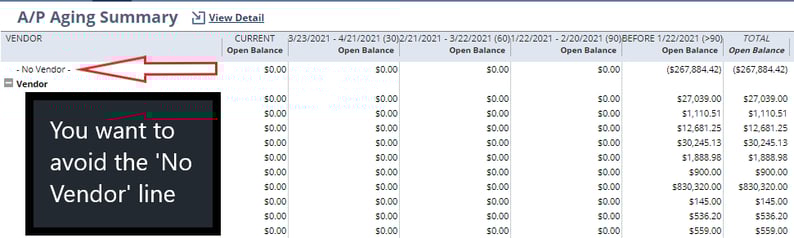
Confirm two things: that the customer and vendor balances agree with the legacy system, and that no transactions are sitting under a "No Customer" or "No Vendor" line. That second issue happens when a journal entry is posted to Accounts Receivable or Accounts Payable without the Name field filled in. The example below shows what that looks like.
How do you tie out the P&L by department and class?
A profit and loss (P&L) tie-out by department and class confirms that your segmented income statement matches the legacy system, not just the consolidated totals. This matters because a consolidated tie can pass while a segment is still mispointed: two accounts that offset at the top level can be swapped underneath.
Run the annual P&L by department and class in both systems for each migrated year, then tie out the net by segment. If your reporting also uses class or location, extend the same comparison to those segments. Confirming the income statement at the segment level lets your team and your auditors, trust department, class, and program report from day one in NetSuite.
This matters most for biotech and other pre-IPO companies. An SEC-style income statement splits operating expenses into research and development (R&D) and general and administrative (G&A), reporting them by department, so those splits have to survive the migration intact. Validate them regardless of how the legacy system tracked the split: I have seen clients encode R&D versus G&A in the QuickBooks GL account structure rather than in a department field. Understanding how those values map into NetSuite before you load makes the tie-out after the migration far easier.
How do you confirm every transaction came across, not just the balances?
The tie-outs above prove your balances match. They do not prove that every individual transaction was imported. When you migrate detailed transactions rather than summary balances, you take on a further obligation: proving that what landed in NetSuite matches the legacy system transaction by transaction.
The tool for this is a detailed transaction tie-out: a full transaction count and metadata analysis that compares your legacy master transaction file against the NetSuite transaction list, test by test, and reports where the two agree and where they do not. An existence test confirms every NetSuite transaction maps back to a valid legacy transaction, so nothing was dropped or duplicated. Metadata tests compare fields such as date, amount, entity, and memo, so the details behind each balance are correct, not just the total. Zero-dollar records, such as voided bill payments, are flagged as not applicable, since they have no GL impact and cannot be loaded.
Every intentional variance gets a one-line reason written directly in the file. That documented file becomes the audit artifact that a controller can point to months later to explain why a number is what it is, without having to reconstruct the cutover from memory.
For the full test-by-test breakdown, see how OptimalData proves a detailed transaction migration is complete.
What goes in the audit documentation package?
A complete package gives your auditors a clear trail from the legacy system into NetSuite. On our projects, it includes:
- The trial balance tie-out for each year-end and as of go-live
- The AR and AP subledger tie-outs
- The annual P&L by department and class
- The detailed transaction tie-out: a transaction count and metadata analysis with every variance documented
- The segment map (bridge) file showing how each legacy value maps to NetSuite
- A migration memo documenting the approach, assumptions, and any variances resolved
Submitting this documentation early is one of the most effective ways to get auditors comfortable with a NetSuite implementation before they start asking questions during fieldwork.
Frequently asked questions
Who prepares the audit documentation, our team or the migration provider?
On an OptimalData project, we deliver the tie-outs and a migration memo that documents the approach, so your team can focus on implementation rather than building reconciliations. If you are validating in-house, the tie-outs in this guide are the same ones your auditors will expect to see.
Can you validate a migration that has already gone live, including summary balances or errors?
Yes. We have helped several clients correct historical data after going live in NetSuite. We assess what was loaded, tie it back to the legacy system, and reload or adjust the detail so the numbers hold up in an audit.
Which legacy systems does this tie-out process work for?
The same tie-out approach works across most legacy platforms, including QuickBooks, Sage Intacct, Xero, Microsoft Dynamics, SAP, Oracle, Great Plains, and NetSuite-to-NetSuite. The process relies on exporting balances and transactions to Excel, which nearly every accounting system supports.
Does OptimalData replace our implementation partner?
No. OptimalData focuses only on data migration and works alongside your implementation partner. They own configuration, reporting, and training. We own the moving and validation of your detailed transaction data.
Validate first, then post
A few tie-outs and a migration memo are usually all it takes to give your auditors comfort over a NetSuite data migration: prove the GL balances tie, tie out the subledgers and the segment-level P&L, confirm every transaction came across at the detail level, and document how you got there. Run these before you post any live transactions, so the opening position you are signing off on is the one your auditors will test.
If you would rather your team spend the cutover configuring NetSuite than building reconciliations, OptimalData delivers these tie-outs and the supporting migration memo for every project. Contact us to talk through your migration.